Skip to content
Mimir

How Mimir Works

Mimir reconstructs the session so you can see what happened: the task, repository, app, models, duration, and token use — plus the redacted exchanges, touched files, real error signals, and whether durable capture succeeded.

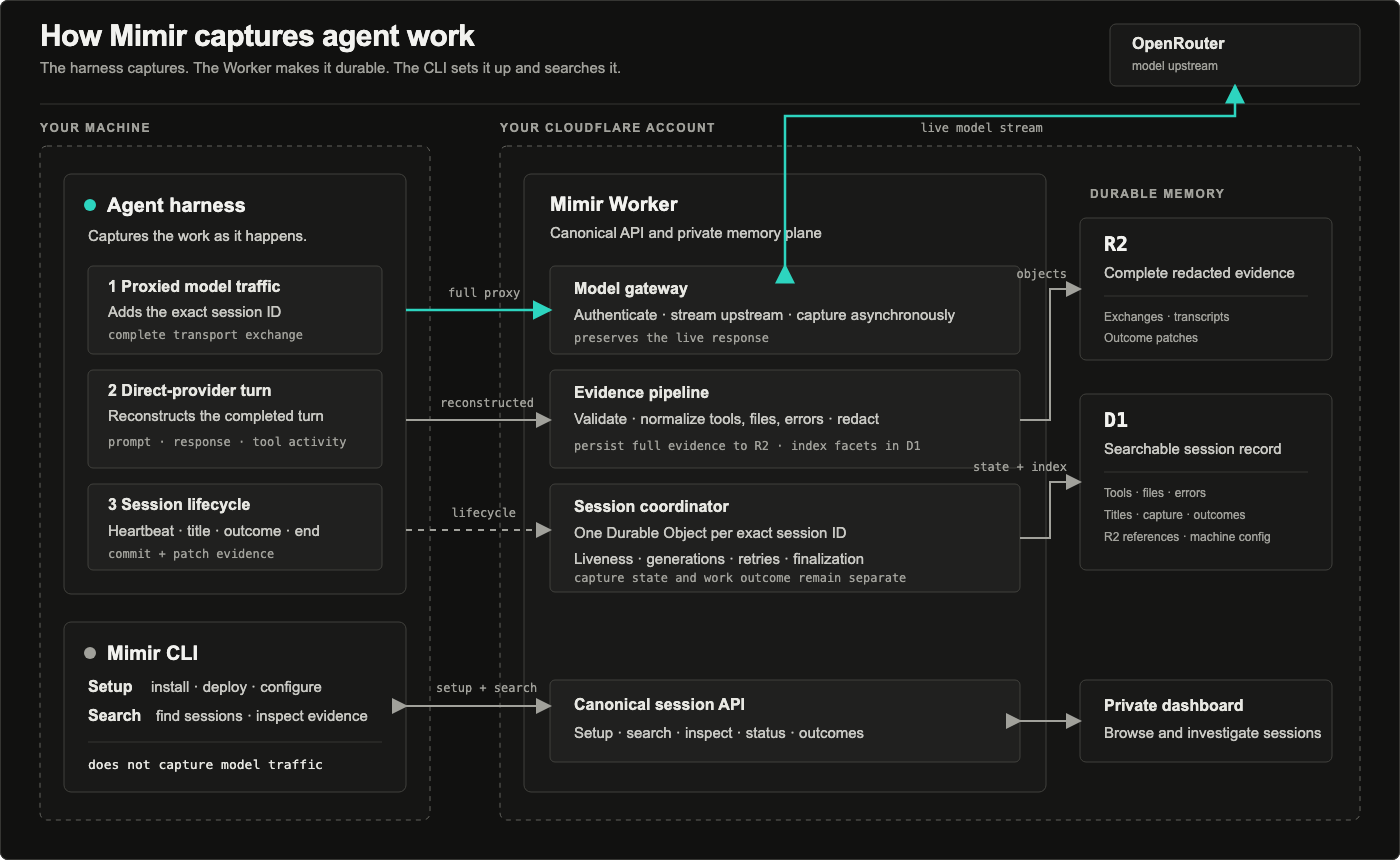
The agent harness captures full proxy exchanges, reconstructed direct-provider turns, and lifecycle events. The private Mimir Worker makes that evidence durable, while the separate CLI handles setup and search.

A session is one episode of agent work, not a bag of disconnected requests. Mimir keeps:

  • the task, repository, app, models, duration, and token use;
  • full redacted proxy exchanges and bounded exchanges reconstructed by supported harness integrations;
  • supporting runs, tool-touched files, real error signals, and model switches;
  • whether durable capture succeeded;
  • whether the work landed, was discarded, was abandoned, or remains unresolved.

That makes prior work useful before the next attempt:

Search: "token validation"
Previous session
outcome discarded
models gpt-5.6-sol, claude-opus-5
files auth.ts, proxy.ts
error token validation failed
Result: the next agent avoids the same dead end.

Mimir deliberately keeps two facts separate:

  • Capture state describes durable memory: Empty, Pending, Saved, Failed, or Partial.
  • Work outcome describes the result: Landed, Discarded, Abandoned, or Unresolved.
  1. Proxied model traffic carries complete OpenRouter requests and streaming responses. The Worker preserves streaming, redacts the exchange, writes the full object to R2, and indexes searchable metadata in D1.
  2. Reconstructed harness exchanges carry the completed prompt and response fields exposed by Pi, OpenCode, Claude Code, Codex, or Cursor. They are bounded reconstructions, not provider transport archives.
  3. Harness events carry turn summaries, heartbeats, titles, session ends, and evidenced work outcomes. They keep sessions live.

x-mimir-session is the authoritative session boundary when available. Traffic without an exact session ID uses bounded inactivity grouping.

Each installed device also has a stable installation_id, separate from its editable display name. Sessions retain that device association.

Traffic path Durable capture Session lifecycle Searchable exchange metadata
Redirected OpenRouter Full redacted transport exchange Yes Yes
Pi direct or subscription provider Bounded reconstruction Extension events Yes, after persistence succeeds
OpenCode OAuth, subscription, or direct provider Bounded reconstruction Plugin events Yes, after persistence succeeds
Claude Code, Codex, or Cursor supported hooks Bounded prompt/response reconstruction Hook events Yes, after persistence succeeds
Hermes Nous portal, OAuth, or direct provider Event-only turn summary Plugin events No
Other tools using Mimir proxy URLs Full redacted transport exchange Capture events only Yes

A scheduled capture response only means persistence was queued. mimir session status is the authority for durable capture.

Search before starting another attempt:

Terminal window
mimir search "token validation" --json

Inspect a complete session record:

Terminal window
mimir session get <id> --json

Verify durable capture:

Terminal window
mimir session status <id> --json

Record an evidenced result:

Terminal window
mimir session outcome <id> landed --reason "merged in PR 42"

Open the private dashboard:

Terminal window
mimir dashboard

The dashboard leads with sessions. Requests remain supporting evidence, one click away when you need the raw record.